
I’m always surprised when I learn that a software developer is aware of Hookmark but does not use it. It suggests I haven’t done a good enough job of explaining the value proposition to developers, because surely it is a huge one. I therefore enlisted ChatGPT to help pressure-test the explanation below against real developer workflows. After all, ChatGPT knows Hookmark and developers well.
Some developers’ reasoning goes something like this:
“I spend most of my time in Xcode. I don’t really switch apps that much.”
Ironically, that’s exactly why Hookmark is useful for developers.
Modern software development is not just writing code. It’s moving constantly between code, issues, documentation, design discussions, test cases, emails, pull requests, and web references—and keeping the context of that work intact over time.
Hookmark is designed to do one thing extremely well:
create durable, bidirectional links between the resources you already use, so you can jump straight back into context instead of re-searching, re-navigating, or re-figuring out what you were doing.
Yes—Hookmark Works with Xcode
Let’s start with a misconception. Hookmark is fully compatible with Xcode. Any file, symbol, or location you can open in Xcode can be linked to—and linked from—other resources on your Mac.
Not using Xcode? Well, Hookmark is also compatible with BBEdit, SublimeText, TextMate and other editors.
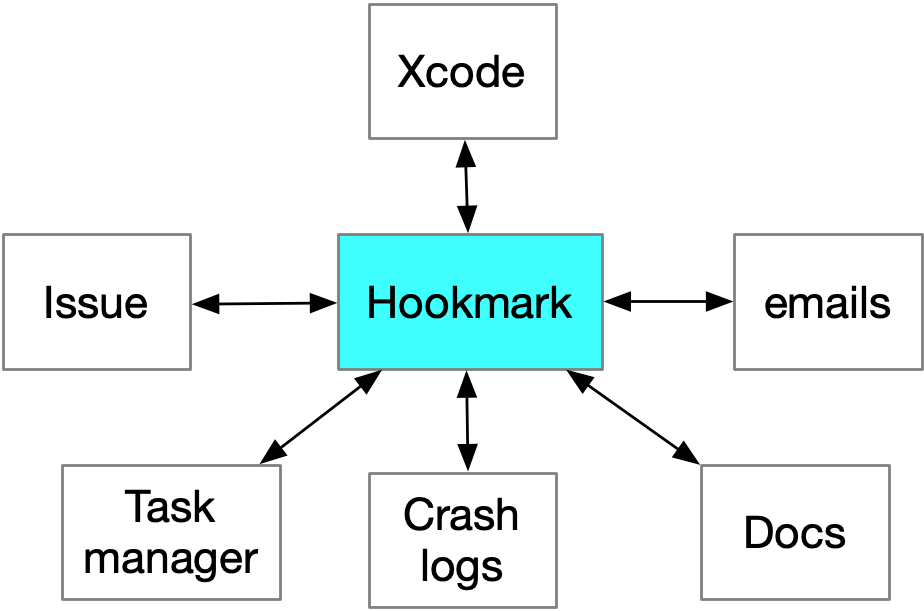
A Common Developer Use Case
You’re editing a source file in Xcode to fix a bug or implement a feature. At the same time, you’re working with:
- an issue in Jira, GitHub Issues, or Bugzilla
- a pull request or code review discussion (even in email)
- a design spec or API documentation
- a Stack Overflow or Apple Developer Forums page
With Hookmark, you can link the Xcode file directly to the issue and other information you’re addressing.
Later, from either side:
- open the issue → jump straight to the relevant code
- open the code → jump back to the issue, discussion, or spec
No searching. No guessing. No “why was I touching this file again?”
Have you received an email containing code review information? You can hook the email directly to a file in Xcode (or elsewhere).
Further Developer-Focused Use Cases
1. Linking Code to Design Decisions
Every non-trivial codebase contains decisions that aren’t obvious from the code itself.
Developers often rely on:
- architecture docs (including UML or Tinderbox or other diagrams)
- design discussions in Notion, Confluence, or Markdown files
- Slack or email threads explaining “why we did it this way”
With Hookmark, you can link:
- a core class or module → the design document that explains it
- a refactored file → the email discussion that justified the change
Months later, you (or a teammate) can answer why in seconds.
2. Pull Requests and Code Reviews
Pull requests are temporary, but the decisions made in them often live on. Use Hookmark to link:
- a PR → the files it modifies
- a controversial change → the review discussion that approved it
This is especially useful when:
- onboarding new developers
- revisiting old tradeoffs
- debugging regressions tied to past decisions
3. Linking Code to Documentation (Internal and External)
Documentation is often scattered:
- README files
- internal wikis
- API references
- Apple docs and WWDC sessions
Hookmark lets you link:
- a method or class → its external API documentation
- a wrapper or workaround → the Apple doc or forum thread explaining the limitation
The result: documentation that stays connected to the code it explains.
4. Debugging and Test Context
Debugging is rarely linear. You may juggle:
- a failing test
- a log file
- a Stack Overflow answer
- a crash report
- a local repro project
Hookmark lets you create a temporary constellation of links around a problem—then dissolve it when you’re done, or keep it for future reference.
This turns debugging from “hunt and peck” into structured problem-solving.
As an example, you can hook a crashlog text file to the key file in Xcode. And/or you can hook that crash log to the bug report (e.g., in Bugzilla or email). That lets you instantly navigate between these resources.
5. Cross-Project and Cross-Repo Work
Many developers work across:
- multiple repos
- shared libraries
- client and server code
- open-source dependencies
Hookmark doesn’t care where things live. You can link:
- a function in one repo → its usage in another
- a forked dependency → the upstream issue or commit
This is especially valuable in long-lived or legacy projects.
6. Developer Notes That Aren’t Another Notes App
Many developers resist heavyweight note-taking tools. Hookmark doesn’t replace your notes—it anchors them. You can link:
- a Markdown note → the code it refers to
- a scratchpad file → the resources it summarizes
Your notes become entry points into real work, not isolated text blobs.
7. Link code to your task list
For any sizable endeavor, developers typically maintain a task list on their Mac. Their tasks might be in plain text or in a task manager like OmniFocus, Todoist, Things or TaskPaper.
With Hookmark you can link key files in Xcode to a project in your task manager. This makes it easy to address the next task — the same day or days later.
Inline Links and Hooks
There are two ways to link things with Hookmark, both of which developers can use.
The first is to copy a link and paste it directly into a code comment or elsewhere. These are inline links, which most developers are already accustomed to. A crucial difference with Hookmark, however, is that these links can point not only to web pages, but also to local files and other objects—such as a PDF stored in DEVONthink.
When those resources are shared—such as files in a shared Git repository that collaborators have cloned locally—those links can be used by anyone who has access to the same underlying resource.
Hookmark file (hook://file/) links are more robust than traditional file:// links: even if the files are moved, the links can still work.
The second way is with hooks, which are bidirectional links managed by Hookmark itself. Hooks are private to the person who creates them and do not modify code, comments, or shared documents. This makes them ideal for maintaining personal working context without adding noise to a shared codebase.
Why This Matters for Developer Productivity
Developers lose time not because they can’t write code—but because they lose context.
- Context is fragile
- Context is scattered
- Context is rarely captured explicitly
Hookmark helps by:
- making context explicit
- keeping it connected
- letting you return to it instantly
This is especially valuable for:
- deep work
- interrupted workflows
- long-term maintenance
- onboarding and handoffs
Hookmark Fits Your Existing Toolchain
You don’t have to change how you work.
Hookmark works alongside:
- Xcode
- GitHub, GitLab, Bitbucket
- Jira, Bugzilla, Linear
- Markdown editors
- browsers
- email and chat
If you already use links, Hookmark makes them stronger, bidirectional, and reusable—across apps, across time.
Final Thought
Hookmark doesn’t replace Git, comments, READMEs, or issue trackers—it complements them by preserving personal and cross-tool context that those systems aren’t designed to hold.
If you’re a developer who thinks:
“I don’t need Hookmark because I live in Xcode”
you may actually be the ideal user.
Hookmark isn’t about replacing your tools.
It’s about linking your work into a coherent whole—so you can focus on building, not re-finding.
Have comments or questions?
Join the discussion in this topic on the Hookmark forum, or send us an email.